The same product, five times, with less screen each time.
A washing machine range runs from a large colour touchscreen at the top to a minimal segment display at the bottom. The interaction language has to survive the whole descent and still feel like one family. That was the work, across washing machines, an induction hob, a microwave and a coffee machine.
Appliance ranges are priced in tiers, and the screen is the first thing the accountants take away.
The top of the range gets a full-colour touchscreen. One tier down, the touch layer goes and a physical knob comes back. Another tier down, colour goes too, and what is left is a monochrome dot-matrix panel with a fixed character grid. At the bottom there is barely a display at all.
Most of this work sits in the gap that creates. If each tier is designed on its own terms, a customer who buys the mid-range model gets a product that behaves like a different brand. The job was to define what stays fixed all the way down, meaning the logic, the layout regions and the gestures, and what is allowed to degrade.
01 / The constraint
One control language, running on hardware that changes underneath it.
The same appliance family ships across several price levels, and the display it can afford changes at every step: a large colour touchscreen at the top, a small monochrome panel in the middle, a minimal segment display at the bottom. The control language has to stay recognisable across all of them. The same region of the fascia, the same icon vocabulary, the same order of operations, rendered in whatever that hardware can actually produce.
-
A large colour touchscreen
Almost everything can live on the screen. Navigation, state, feedback and secondary settings are all the display’s job.
-
A small monochrome panel
No touch, so navigation moves to an encoder. The screen reports state; the hand does the moving.
-
A minimal segment display
The display can show a value and little else. Every remaining function has to be a physical control or be cut.
- What the display carries
- What the hardware carries
02 / The trade
What the screen stops doing, the hardware has to start doing.
The interesting part of scaling down is not subtraction, it is transfer. Digital and physical are not independent choices. They are two halves of a fixed total, so every function the display gives up has to reappear as a physical control or be removed from that model entirely.
Same regions, same reading order, different pixels.
Consistency across the range was held by layout rather than by rendering. Menus, editing, the programme list and settings keep the same positions and the same reading order on every display, so a user who has met one machine can read another.
What changes is how each panel expresses the same state. A selected item that gets a soft glow on a colour screen gets a hard box on a monochrome one, because a box is what that panel can draw. Contrast was checked against real display modules rather than against a mockup, since a monochrome layout that reads on a laptop can disappear on the part that is actually being bought.
03 / Language
One component carries the language, because it is the only one always there.
The brand already had a design language covering composition, details, gesture and proportion. My proposal was to hang it on the control tab rather than on the display, because the tab is the single element present on every machine in the family. Tie the language to the screen and it evaporates at the tier where the screen does.
Four moves, three kinds of input.
The tab resolves to a small fixed set: a push to turn on, a digital programming step, a slide for a continuous setting, and a push to start. Nothing else.
Programming stays on the screen, where changing it is cheap. Anything with a physical consequence stays a physical gesture, and that is the decision that lets the lower models keep the interaction after the screen is gone. The gesture survives the hardware.
The fascia studies and the brand-language boards are unreleased product, so they are described here rather than shown.
The constraint is not the small screen. It is that the small screen and the large one have to be the same product.
The working boards
The evidence sits behind a password.
The reasoning above is mine to share. The boards it came from are not: they carry product tier names, display specifications and interface designs that have not been released. They are here, encrypted in this page, for anyone who has a reason to see them.
Six boards: the range, the display technologies, the digital-to-physical transfer, layout consistency across panels, the brand language, and the tab interaction. Email me if you need the password.
04 / Induction hob
A cooking flow that has to survive a boiling pan.
The hob UI was built for the IFA exhibition. The demo above is the running interface; the flow below is what it is built on.
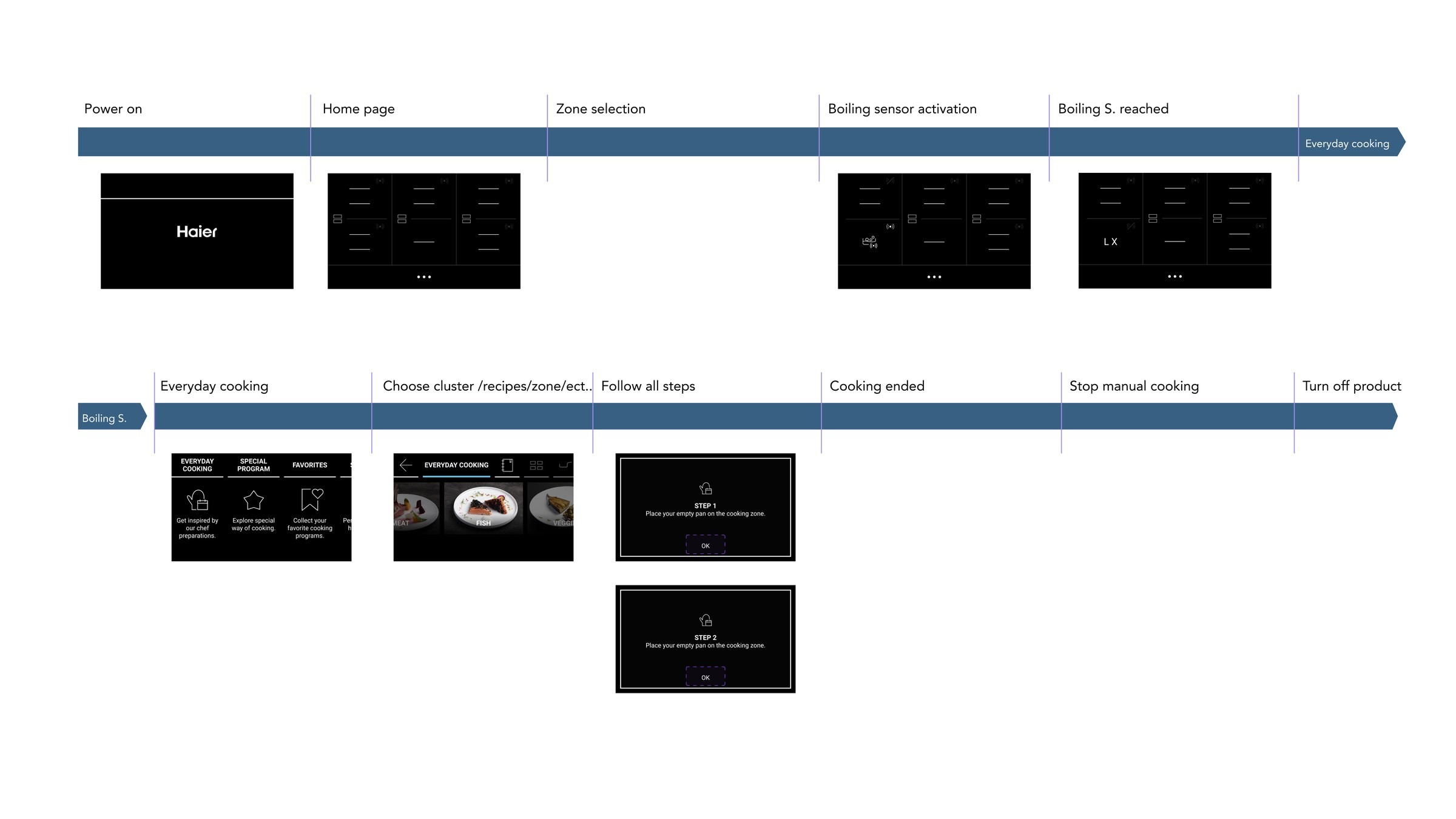
The guided screens are deliberately one instruction at a time, such as “place your empty pan on the cooking zone”, then OK. Cooking is a wet, hot, hands-busy context, and the display is set into the hob surface itself: anything that needs a second read has already cost more attention than it is worth.
05 / Specification
Most of the work was writing down exactly what the machine does.
Concepts are the visible part of an internship. The larger part was specification: turning agreed behaviour into documents an engineering team can build from without having to ask what happens next. The deliverables were state-by-state flows, annotated with every transition, every branch and every case that is easy to forget until a user finds it.
-
State-by-state interaction flows
Each step of a task drawn as the display actually renders it, with the control that causes each transition labelled on the arrow between them.
-
Manual and preset operating modes
Two routes through the same machine, specified separately and then checked against each other so the shared screens behave identically in both.
-
Feedback and blinking rules
What blinks, at what rate, and what that rate means. On a panel with no room for text, timing is most of the vocabulary.
-
Interruption and resumption
Pause, resume and attend-to-the-food states: the cases where a user leaves a running programme and has to be able to pick it up again.
-
Control mapping
Every physical control documented against what it does in each state, including the states where it does nothing and has to say so.
-
Editing while running
Changing temperature or time mid-programme, which is where most of the edge cases live and where the specification earns its keep.
The specifications themselves are internal, so they are described here rather than shown. The work ran across several appliance lines in parallel, which is where the priority-switching below came from.
Conclusion
What I would carry into the next one.
Three things about the craft, and three about working, taken from my own notes at the end of the internship and from what my mentor kept returning to.
-
Design the worst case first
Starting from the most limited display and working up produces a system. Starting from the flagship and cutting produces three unrelated products and a long argument about what to lose.
-
Screen budget and hardware budget are the same budget
Deciding that a function is digital is really deciding which models get to have it at all. The two are not separable decisions.
-
Test on the panel, not the mockup
A monochrome layout that reads on a laptop can disappear on the module that is actually being bought. Contrast has to be checked against the real part.
-
Understand the logic before designing to it
My mentor’s first correction, and the one that stuck. Learn why a constraint exists before proposing around it, because these are things people will actually use and the reason is usually load-bearing.
-
Hold several tasks and know their order
Parallel product lines mean knowing which task is genuinely blocking and being willing to switch. Coming back to a problem after time on another one surfaces detail that staring at it does not.
-
Asking early is a skill, not an admission
The fastest corrections came from asking someone who already knew, rather than from working it out alone.